I Built Myself a Morning Newspaper (and It Blue-Screened My PC)
Every morning, the same twelve tabs
My mornings used to go like this: open Gmail, scroll past the junk, try to spot anything I actually have to do. Check whether anything in the lab fell over during the night. Check the weather. Check whether a package is coming. Open Reddit “for the news” and lose twenty minutes.
So I asked a simple question: what if all of that was already on one page when I woke up?
That page now exists. Every morning at 7:00 my server builds a briefing: one screen with everything I’d normally go digging for, written by an AI that runs on my own hardware. No cloud AI ever reads my email.
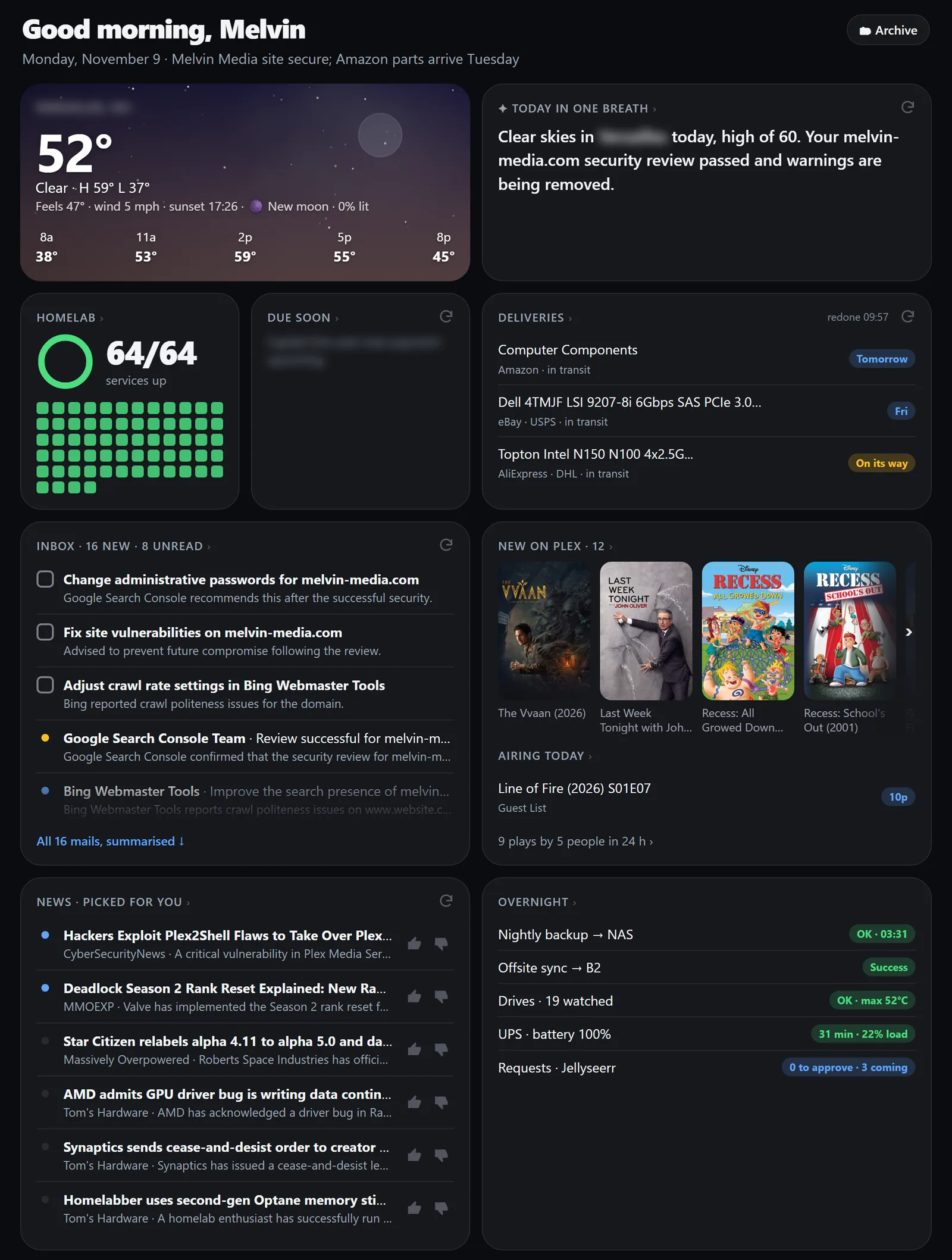 This morning’s briefing. The blurry bits are my town and my bills. Nice try.
What’s on the page
The layout is a “bento box”: a grid of tiles in different sizes. I had five different mockups made before picking this one.
- A headline for the day: a one-line summary of what matters this morning, written by the AI.
- Inbox: to-dos pulled out of my email, each one with a checkbox, then the rest of the mail, boiled down to a line each.
- Money: bills and charges that showed up overnight.
- Deliveries: what’s coming and where it is (more on this one below).
- News: six stories picked for me, each with a short summary.
- The lab: a dot for every container and app, plus last night’s backup, the offsite sync, drive health and the UPS.
- Plex: posters of what got added overnight, what got watched, and what’s airing today.
- Weather and calendar.
The rule I gave myself: everything on the page is a link. A to-do opens the email it came from. A poster opens the movie in Plex. A red dot opens that container in Portainer. A bill opens the bill. If the page tells me something, one click gets me to the place where I can do something about it.
The AI lives in my PC, not the cloud
The brains are Ollama running on my desktop’s graphics card. The server collects everything during the night, then at 7:00 hands it to the model piece by piece: summarize this mail, pull the to-dos out of these, pick the news, write the headline.
Picking the model was its own little tournament. I ran the same mornings through three of them, qwen3.6 35B, gemma4 31B and qwen3.8 27B, and the smallest one won. It followed instructions best and kept its answers short, which matters a lot when every answer has to fit in a tile.
A few things I learned the hard way:
- Small AIs love to ramble. One answer once ran for 8,000 tokens because the model got stuck in a loop. Now every request has a hard length limit, and the answers have to come back as structured data with a maximum length per field, so a summary physically can’t outgrow its tile.
- “Matches your interests” is not a summary. When I asked for news picks with a reason, the AI happily wrote “this matches your interest in homelabs” instead of telling me what the article said. The fix was sneaky: there’s now a hidden “reason” field it can fill with that stuff, and a separate summary field that’s actually shown. Give it somewhere to put the fluff and the summary gets better.
- One thing at a time. Seriously. Early on I sent two requests at once while it was still loading a different model, with a big download running in the background. My PC answered with a blue screen (stop code
0x154, for the fellow sufferers). Now it’s strictly one request at a time, it unloads every other model first, and it frees the graphics card again when it’s done.
My PC also has to be awake for this, so a scheduled task wakes it up at 6:55 and makes sure Ollama is listening. If the PC doesn’t answer anyway, the server waits a few minutes and then builds the page without the AI parts. A briefing with no summaries beats no briefing.
It learns what I care about
To-dos you tick stay ticked. Every to-do has a checkbox, and the AI gets the last week of ticked items as “already done”. That alone wasn’t enough: the AI would just reword the same task and hand it right back to me. So now every to-do remembers which email it came from, and any new to-do pointing at an email I already ticked off gets thrown out, no matter how it’s worded.
The news has a taste profile. News comes from my own FreshRSS with a pile of feeds: Steam news for the games I play, ServeTheHome, r/selfhosted and r/homelab, Hacker News, release notes for software I run, and a few Google News searches for topics without a proper feed. That’s way too much to read, so the AI picks six. To pick them, it gets a description of my interests (which I had Gemini write from my own Google activity, which was a little too accurate) plus my 👍 and 👎 votes on earlier picks. Thumbs-down enough patch notes for a game I quit and they stop showing up.
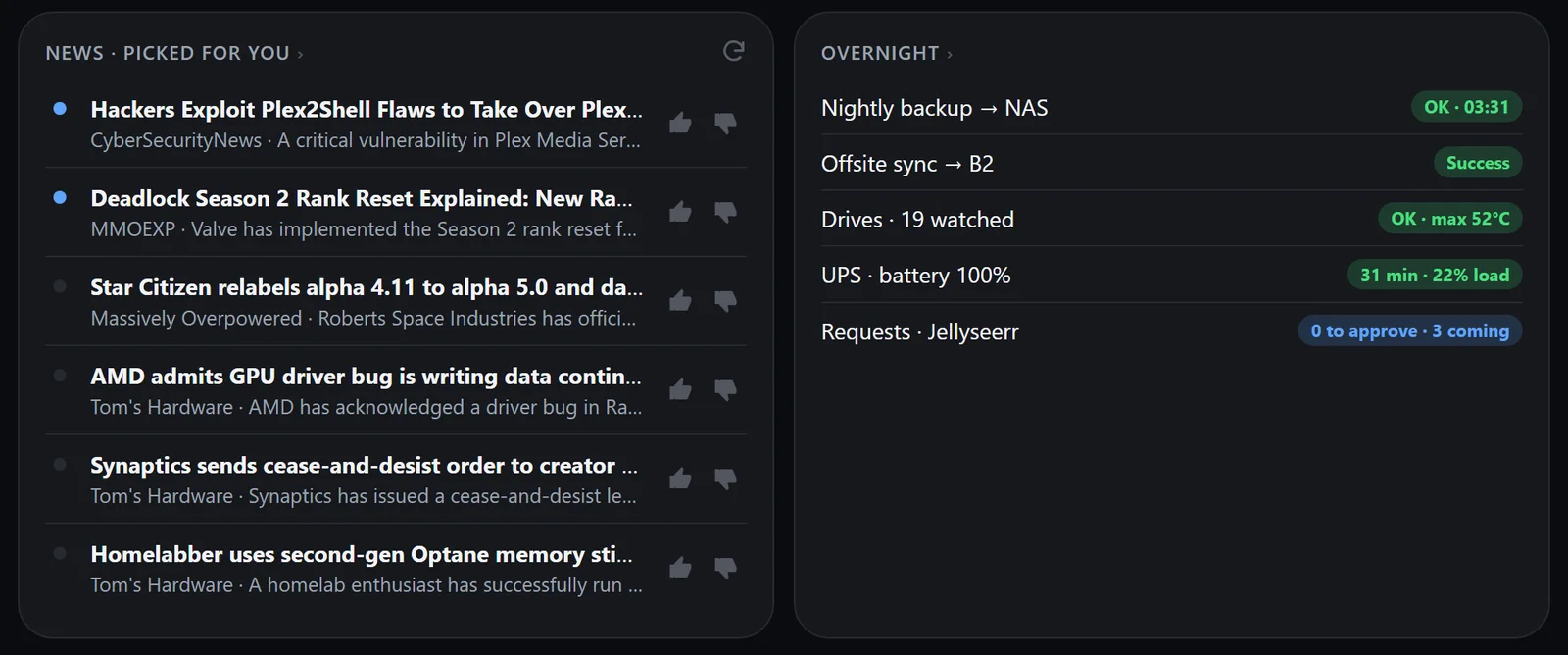 Today’s six picks (yes, Plex security news made the cut) next to the overnight report card.
Don’t like a tile? Reroll it. The AI tiles have a ↻ button. Press it and the server redoes just that one part. For the news, it picks a fresh set that avoids what’s already showing.
It stays fresh all day
The AI only runs once, at 7:00. But the boring parts refresh every five minutes, no AI needed: the lab dots, the weather, Plex, the calendar. If I leave the page open, it quietly swaps in whatever changed. So the briefing is also my “is everything okay?” page for the rest of the day.
Older days get frozen into a read-only copy with an archive page, in case I ever need to know what my inbox looked like last Tuesday. (I won’t. But I can.)
The parcel tracker (no AI allowed)
The newest part, from today, is the Deliveries tile, and it’s the one part where I took the AI out.
Asking an AI to read shipping emails sounds perfect, but it kept making up tracking numbers that looked real and weren’t. So now a plain old script does it. Every 15 minutes it looks for new shipping emails and pulls the tracking numbers out of the carrier links (even when they’re buried inside an email’s click tracker). Tracking numbers have a built-in check digit, so a number only counts if the math works out. No more made-up numbers.
Once it has a number, it asks the carrier directly (USPS, UPS, FedEx, DHL) and checks more often as the package gets closer: every 15 minutes when it’s out for delivery, about hourly in transit, every few hours overnight. When something is out for delivery, delivered or stuck, my phone gets a notification.
Some shops never give you a number at all (looking at you, Amazon). For those it reads the order emails instead, and if a real tracking number shows up later for the same order, the two get merged.
Good timing, too: there’s a new router somewhere between China and Ohio right now, and I’d like to know the second it gets here.
What’s next
- The calendar tile is built but hidden, because I haven’t hooked up my calendars yet.
- Uptime Kuma watches pretty much everything in the lab, except the briefing itself. Ironic.
- Waking my PC from the server over the network doesn’t work, because Windows’ generic network driver doesn’t support it. For now the scheduled wake-up at 6:55 does the job.
It’s not open source (yet), mostly because it’s very tangled up with my lab and my inbox. But if you run Ollama at home and you’re tired of your twelve morning tabs, this is a fun weekend project. Several weekends, if you’re me.