I Fixed My Car Stereo (Your Mileage May Vary)
Audiobooks in the car shouldn’t be this hard
Most of my listening happens in the car. My audiobooks live in Audiobookshelf on my NAS, and the Audiobookshelf Android app is great on the phone. Plug the phone into the car, though, and Android Auto turns it into a much dumber player.
The big one: Android Auto has no idea what a chapter is. A 20-hour book is one 20-hour progress bar. Skip goes 30 seconds, not to the next chapter. You can’t see which chapter you’re in, let alone jump to one. On top of that, covers for downloaded books would go blank, Android Auto would sometimes start playing on its own (or open to an empty player), and my progress didn’t always make it back to the server, so the phone and the car would disagree about where I was.
So I forked the app and fixed the parts that bugged me. That was a couple of months ago, and I never wrote it up. Listing everything that runs my homelab reminded me, so here it is.
People have been asking for this for years
I’m not the first person to want this. The app’s issue tracker has over 200 issues that mention Android Auto. Some highlights:
- September 2021: Android Auto is requested in issue #2. Android Auto support did land, and it works. It’s just basic.
- January 2022: Add skip ahead and chapter control on Android Auto. Still open, almost four years later.
- January 2022 onward: a steady stream of “lost my position” reports tied to Android Auto: #91, #402, #425, and #1491 from 2025, still open.
- April 2022 to August 2026: covers for downloaded books missing in Android Auto, reported again and again: #141, #1330, #1565, #1973.
- June 2022: Show progress by chapters instead of by audio file. Open.
- October 2022: Queue audiobooks and podcast episodes, with over 100 thumbs up. Open.
- January 2023: Display chapter in Android Auto. Open.
- September 2023: A faster way to resume playback. Open.
And it’s not for lack of people trying to fix it. The app’s pull request queue has Android Auto fixes waiting too: faster Android Auto menus from May 2025, chapter-relative notifications from April 2026 (no reviews yet), and a pile from just the last few weeks, including fixes for progress saved under the wrong book and resuming the last session. Turns out I wasn’t the only one chasing the same bugs.
To be fair to the Audiobookshelf folks: it’s a free, open-source project run by a small team, and the server side gets a ton of love. Android Auto is a niche inside a niche, and Google’s media APIs for it are not fun to work with. But if you’ve been waiting since 2022 for chapters in your car, I get it.
What I changed
All of this is in my fork, audiobookshelf-app-enhanced-android, built on top of the official v0.14.2-beta.
Chapters in Android Auto
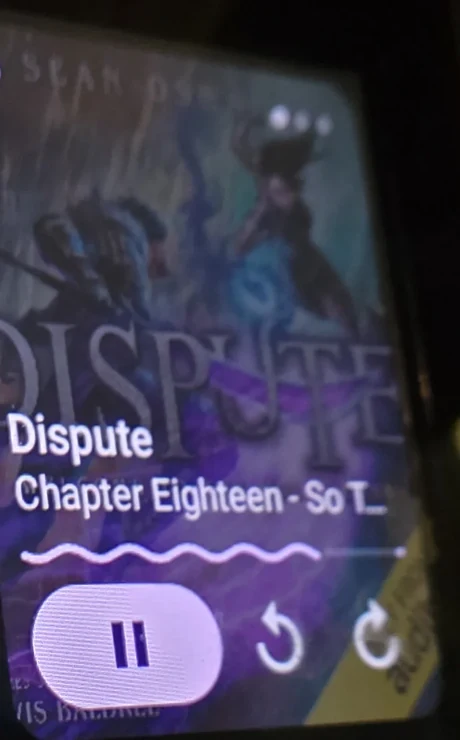 In my car: the chapter name and a progress bar for just that chapter.
- Chapter track: the media controls show the current chapter’s title, length and progress, instead of one giant bar for the whole book.
- Chapter skip: skip forward and back move between chapters.
- Skip previous works like a real player: it restarts the current chapter, or goes back one chapter if you’re within 4 seconds of the start. Same as the in-app player.
- Chapter queue: the queue button lists the book’s chapters, starting from the one you’re on (Android Auto can’t scroll the list to the current item, so it starts there). Tap a chapter to jump to it.
- The chapter display no longer gets stuck on the previous chapter until you pause.
Next Book
A Next Book button shows up when there is one: the next book in a playlist that contains the current book, otherwise the next book in its series. If you’ve downloaded it, it plays the downloaded copy. Perfect for series binges on long drives.
Picks up where you left off
- Android Auto opens with your last played book ready instead of an empty player.
- It only starts playing if Android Auto’s own “Start music automatically” setting is on. Otherwise it waits, paused, like it should.
- Playback started in the car shows up in the phone app.
Progress that actually syncs
- Pausing always saves your progress to the server.
- The app syncs when Android Auto starts it, even without the phone app open, and sends any progress that failed to sync earlier.
- When the phone and the server disagree, the most recent progress wins. Before, newer progress on the phone could get overwritten by older progress from the server.
- Next Book no longer saves the new book’s progress to the previous book (that one was a fun bug to find).
Covers and the home screen
- Covers for downloaded books show in Android Auto again, including the split-screen media card.
- On the phone, your home shelves load instantly from a cache instead of sitting on a loading screen while the app connects to the server.
Try it
The latest release has an APK you can install on your phone.
A few honest caveats:
- It’s a test build, signed with a debug key. It installs as a separate app next to the official one. It doesn’t replace it, and it doesn’t share its downloads or settings, so you’ll sign in and download your books again.
- It’s not official and not supported by the Audiobookshelf team, so please don’t send them bug reports about it. Report them on my fork instead.
- Android Auto may ask you to allow apps from unknown sources (developer settings), since it isn’t from the Play Store.
What’s next
You might ask why I didn’t just send these as pull requests. Short answer: the code I changed is about to be replaced.
The Android app plays audio with ExoPlayer 2, which Google has put in maintenance mode in favour of its successor, Media3. There’s a big pull request to move the app to Media3: about 9,000 new lines across 81 files, open since December 2025. The player is exactly where all the Android Auto code lives. When someone bumped the chapter notifications PR in July, the maintainer replied that they were reviewing the Media3 one first, and its author offered to wait and rebase on top of it. Any Android Auto PR I sent now would need the same rework.
The rest of Audiobookshelf is mid-rewrite too: the team is building a brand-new web interface for version 3, and they’ve said that’s the current focus. It’s a hobby project run by people with day jobs, with over 1,000 open issues and feature requests between the server and the apps, so I’d rather not add my pile of Android Auto changes to the review queue right now.
So for now the fork is the plan: I’ll keep it rebased on the official releases, and if the official app gets proper chapters and syncing in the car, I’ll happily retire it. Until then, my car finally knows what a chapter is.